How to Rank Higher in Bing Search Results
According to comScore data from 2013, Bing held about 17.9 percent of the US search market. Even today, most people focus almost entirely on Google and assume that whatever works for Google must work for every other search engine.
That assumption is wrong.
The complete guide to Bing SEO optimization shows you how to rank higher in Bing search and get more organic traffic from Microsoft's search engine. This matters because ignoring Bing means ignoring millions of potential visitors.
If you are looking to grow your presence in the American market, some businesses choose to buy USA website traffic through platforms like KeyUpSeo to complement their organic efforts. This gives you a baseline of real visitors while you build your Bing and Google rankings over time.
Why Bing SEO Matters for Your Business
The difference between Bing SEO and Google affects your ranking strategy. Learn key factors for Bing including social signals, page relevance, and video content.
Here is what most marketers miss: Bing powers Yahoo search and Microsoft's own products like Windows search and Cortana. It also handles a significant portion of desktop searches in the US and other markets. If you only optimize for Google, you leave this traffic on the table.
This guide covers everything you need to know about Bing SEO. No outdated advice. No copy-paste from Google guides. Just what actually works for Bing.
Let me walk you through how Bing works, what it values, and how to adapt your approach to rank higher in its results.
How Bing and Google Differ in Content Evaluation
Google and Bing both want high-quality, unique content. That much is similar.
But how they evaluate and rank that content is different. Understanding these differences helps you optimize for both without doubling your work.
Shared Priority: Quality Content
Like Google, Bing prefers original, valuable content. Both search engines rank sites higher when they provide rich, user-friendly content. Thin pages with little value do not perform well on either platform.
The difference is enforcement. Bing has been less aggressive than Google at removing low-value pages from search results. So while Bing wants quality content, its algorithms have not been as effective at pushing down poor quality pages.
Where Bing Places More Weight
We have noticed that Bing gives significant weight to keywords appearing in titles, URLs, and meta descriptions. These on-page elements matter more for Bing than they do for Google.
Google, by contrast, focuses more heavily on off-page factors like backlinks and domain authority. Google also generates dynamic snippets based on the user's query, pulling text from anywhere on the page, not just the meta description.
If a page does not have a meta description, Bing flags it as an error in its analysis tools. Google does not penalize missing meta descriptions in the same way.
What This Means for Your SEO Strategy
For Bing, pay extra attention to your on-page elements. Write clear, keyword-rich titles. Include relevant keywords in your URLs. Always write unique meta descriptions for every page.
For Google, continue focusing on backlinks, content quality, and user experience. The two search engines complement each other. Optimizing for Bing often improves your Google performance too, but the reverse is not always true.
Content Optimization for Bing
To rank higher in Bing, you need to create quality content. Bing uses several specific indicators to evaluate your content's value.
These include your content length, whether your content contains images, videos, or relevant media, and whether your content generates user engagement like blog comments or forum responses.
If you want to see real examples of well-optimized articles, check out our SEO blog content for practical guides that follow these exact principles.
Key Content Guidelines for Bing
Use HTML Tags Effectively
Bing loves proper HTML structure. Use H1, H2, H3, paragraph tags, and strong tags appropriately. These help Bing understand your content hierarchy.
Meta Descriptions Matter More on Bing
Bing values meta descriptions significantly. The recommended length is between 25 and 150 characters. Do not leave your meta description empty, and avoid duplicating your page title in this field.
Meta Keywords Still Work on Bing
Unlike Google, Bing still considers meta keywords useful. Keep them short and relevant. They add value for Bing's algorithm.
Title Tags Optimization
Your title tags should be between 5 and 65 characters. Avoid special characters like quotes, angle brackets, curly braces, or parentheses. Ensure each page has a unique title. Duplicate titles hurt your Bing rankings.
Language Declaration
If you are targeting a specific language, you can declare it in the head section of your page using the following code (this example is for US English):
<meta http-equiv="content-language" content="en-us" />
Once your content is optimized for Bing, you are ready to move to the next section.
How to Get Your Content Indexed in Bing
When you have many pages on your site, you naturally want them all indexed in Bing. There are several important recommendations to keep in mind.
Crawlability - Making Your Pages Findable
Before Bing can index your pages, it needs to find them first.
Take a WordPress site as an example. If you create a page from the WordPress dashboard but do not add any internal or external links to it, search engines will not be able to discover it. No links means no discovery.
Best Practices for Better Indexation
Create and Submit an XML Sitemap
The most reliable way to ensure your internal pages get indexed in Bing is to create an XML sitemap and upload it to Bing Webmaster Tools. Include your most important pages in this sitemap.
Use Navigation Menus and Widgets
Having a tool in your footer or sidebar that displays your latest content helps search engines find and index your site faster. Fresh and updated content also encourages more frequent crawling.
Check Your Robots.txt File
Make sure that pages you want indexed are not blocked by your robots.txt file. Similarly, you can use robots.txt to block crawling of unwanted pages so they do not appear in Bing's search results.
Site Structure and Technical SEO for Bing
When you set up your website, pay close attention to your site architecture. Invest in a structure that relies on text based navigation. Even pages deep within your site should not be more than four or five clicks away from your homepage.
If your site architecture is well designed, it becomes much easier to impress both users and search engine bots. In addition to an XML sitemap, you can also create an HTML sitemap to help users navigate your site more easily.
Bing also prefers clean, short, and descriptive URL structures.
If you are looking for practical strategies beyond search engine optimization, the Top App Marketing Tips for Fast Growth guide covers how to apply similar principles to mobile app promotion.
Internal Linking Strategy
Link from your most important pages to your best content. Use relevant anchor text, but avoid making it identical to the target page title. It just needs to be related to your content.
Using anchor text like "click this post" may not hurt your SEO, but it is bad for user experience. Instead, anchor text should give a short hint about the linked page. Anchor texts are also valuable for search engines and act as relevant off-page SEO factors.
Meta Robots Tag
The <meta name="robots"> tag can be used in different ways. You can place the following code in your page head section to handle duplicate content issues:
<meta name="robots" content="noindex,follow">
This tells search robots not to index the page but to follow its links. If you want Bing specifically to follow your instructions, replace "robots" with "bingbot".
Using noindex for pages you do not want indexed is a smart approach.
Bing Webmaster Tools
Bing Webmaster Tools offers a variety of useful data and features for site owners. It allows you to guide Bing's indexing and crawling process so your site appears the way you want it to.
If you want to measure how well your pages are optimized for search, the On-Page SEO analysis service from KeyUpSeo can help you identify technical issues that affect both Google and Bing rankings.
You can view various statistics and status reports for your site in the Home section of Webmaster Tools.
Let me walk you through the most useful features and tools available in Bing Webmaster Tools.
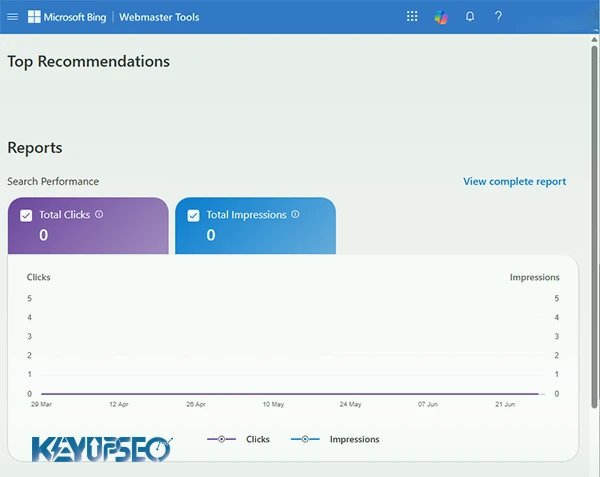
Page Traffic Reports
This section shows your best performing pages in Bing search results. It includes statistics like clicks from search results, total searches, and click through rate. This data combines traffic from both Bing and Yahoo search.
Sitemap Submission
You can submit your XML sitemap through Bing Webmaster Tools. The platform also supports submitting different types of sitemaps. The process is straightforward, and Bing does not spend much time crawling URLs listed in your sitemap.
Unlike Google's sitemap feature, Bing allows you to submit sitemaps for any address, not just your own website.
Managing URL Parameters in Bing
Bing has a different approach to handling rel="canonical" tags compared to Google. To avoid duplicate content issues caused by URL parameters, Bing created a dedicated module called "Ignore URL Parameters."
This module helps you solve duplicate content problems. Simply register the parameters that are causing issues, and Bing will handle the rest automatically.
Crawl Control in Bing
Bing offers an excellent feature for controlling how its bots crawl your website. You can set the crawl speed throughout the day, ranging from slow to fast. Several default options are available for you to choose from.
Bing determines the best crawl speed based on your site's traffic data. For example, if your site receives the most visitors between 5 AM and 9 AM, Bing will use the slowest crawl speed during those hours and gradually increase it afterward. This prevents your server from being overloaded during peak traffic times.
If you are looking to increase organic traffic over time, managing crawl efficiency ensures Bing can index your new content faster without hurting your site's performance during busy hours.
Disavowing Links in Bing
You can disavow links at the URL, domain, or directory level. Unfortunately, you need to submit them one by one. Disavowing is a method where you ask search engines not to consider unnatural backlinks when ranking your pages.
This is an advanced feature. Google warns users to use it carefully. Disavowing a link should not be your first priority when you discover a spam backlink. You should always try to remove these links first. Only use the disavow tool when you cannot remove spam links manually.
Blocking URLs in Bing
One useful feature in Bing Webmaster Tools is blocking individual pages or entire directories. These blocks apply for 90 days and expire after that period.
If a blocked page still exists after 90 days, it can be indexed again in Bing results. You can block current pages with their cached versions, or just block the cached copies.
SEO Reports in Bing Webmaster Tools
This section is Bing's version of Google's HTML improvement suggestions. It scans your site and identifies issues like duplicate titles, too many H1 tags, and missing meta descriptions.
If you want to learn how to research keywords effectively across different platforms, the Using Google Keyword Planner guide covers practical strategies that apply to Bing as well.
Incoming Links Report
You can view your raw backlink count from the past thirty days or any other time period. You can also see which pages received the most backlinks.
When you click on internal page URLs, you get a list of external links pointing to that page. This is very useful, but keep in mind it only shows backlinks that Bing has discovered.
Keyword Research Tool
This section lets you find query volume for specific keywords. A useful feature is that you can enter multiple keywords at once and customize searches based on time period, location, or language.
This is especially helpful when planning content for different regions or audience segments.
SEO Analyzer Tool in Bing
This section allows you to check your pages against Bing's on-page SEO guidelines. This feature is still in beta, and most users do not find it particularly helpful at this stage. It is better to rely on other tools for a full site audit.
Structured Data in Bing
Bing encourages webmasters to use structured data and rich snippets on their sites. Users can make decisions through visually appealing search results. As a content creator, you should create this experience using structured content.
Bing currently supports the following formats:
- Microdata
- Microformats
- RDFa
- Schema.org
- Open Graph
Using these formats helps Bing understand your content better and can improve your visibility in search results.
Site Move Tool
Another valuable feature in Bing Webmaster Tools is the Site Move tool. You can use this option to notify Bing about changes to your site structure.
For example, if you are changing your URL structure, you can specify the source and destination URLs at the directory level. You can also specify subdomain level and domain level URL transfers.
This helps Bing understand your site changes faster and prevents ranking drops during migration.
User Engagement Signals in Bing
Bing has repeatedly stated that user engagement with search results matters significantly to their algorithm. A lower pogo-sticking rate helps your pages perform better in Bing search results.
To benefit from this, create pages that satisfy searchers, provide what people are looking for, present information in an accessible way, and are easy to read with proper formatting. Including images, videos, and other essential media also improves user experience.
Social Signals in Bing
Bing considers social signals important and incorporates them into its algorithms. Having a strong presence on social media can help you achieve better results in Bing.
However, the number of likes, tweets, or shares is not the main focus. Bing pays more attention to the authority and social credibility of the content creator and the person sharing it. This means your content should be excellent, useful, and shareable enough to spread across platforms during a specific time period.
If your social media efforts are not delivering the results you expect, the guide on 10 Reasons Social Media Is Not Working covers common mistakes that also affect how search engines view your brand authority.
Site Speed Matters to Bing
As mentioned earlier, Bing values user satisfaction highly. Faster page loading leads to better user experience, which is important for Bing. Slower sites can lose visitors unless they offer exceptionally valuable content. The faster your site loads, the better, but speed should be balanced with content quality.
Co-Citations and Contextual Links
Co-citations refer to the text surrounding links that point to your site. While there is no official explanation from Bing about the importance of this factor, existing research suggests that links placed within relevant content with related surrounding text tend to perform better.
Backlinks in Bing
Bing uses backlinks to determine a page's authority, similar to Google. However, Bing does not treat the number of backlinks the same way. Bing places more emphasis on relevance and social signals.
A site with fewer but more relevant backlinks and strong social signals can maintain good rankings in Bing over time.
Quality Over Quantity
Bing responds differently to large volumes of low-quality links compared to Google. Both search engines prefer natural, high-quality links, but ranking on Google's first page with just a few quality links is generally harder than on Bing.
From experience, Google values backlink quantity more than Bing does. Links also help Bing discover new content. When a site links to your content, it signals trust in your site.
Types of Links Bing Dislikes
- Link exchanges: backlinks exchanged to manipulate search algorithms.
- Low-scale paid links: purchased links in small quantities.
- Large-scale paid links: sites that buy and sell links in bulk, often called link farms.
- Spam and hacked links: links from compromised or spammy sites.
How to Build Links for Bing
Here are effective ways to build natural backlinks for Bing:
- Create useful, high-quality content that people enjoy reading, sharing, and linking to.
- Grow your site to become an authority in your niche. Establish your site as a trusted resource.
- Add social sharing buttons so visitors can easily share your content. Social shares increase visibility and accelerate natural link building.
- Occasionally, reach out to trusted sites and request a link. Many site owners are happy to link to quality content.
If you want to track which of your link building efforts are actually working, learning How to create a UTM Link helps you measure exactly which backlinks and campaigns drive traffic to your site.
External Links
Bing advises webmasters to be cautious about sites that link to you. It also recommends monitoring the number of external links pointing to each page. External links to spammy sites can be much more harmful than spammy internal links.
Bing Penalties
Bing does penalize sites that violate its guidelines. Sites removed from Bing's index due to penalties are marked as "blocked" in Bing Webmaster Tools.
To avoid penalties, avoid the following:
- Low-quality content, user-generated spam, duplicate content, or thin content.
- Showing different versions of pages to search engines and users.
- Spammy, hacked, artificial, low-quality, or paid links.
- Buying likes, tweets, followers, or exchanging them.
- Using meta refresh redirects
Bing SEO Is an Opportunity You Should Not Ignore
Most website owners focus almost entirely on Google while ignoring a search engine that handles nearly 20 percent of US desktop searches and powers Yahoo search.
That is a missed opportunity.
Bing is not harder than Google. It is just different. Better content, cleaner site structure, proper meta descriptions, and faster load times help everywhere. But Bing has its own personality. It cares more about social signals, meta keywords, and exact match terms in titles and descriptions.
Start with one or two Bing-specific optimizations this week. Write better meta descriptions for your key pages. Submit your sitemap to Bing Webmaster Tools. Monitor your performance there.
The traffic you gain from Bing might not match Google overnight, but it is traffic your competitors are ignoring. Every visitor counts.
While you build your SEO foundation, there are other creative ways to grow your income online. The 6 ideas to earn money with a phone guide covers simple side income opportunities that can complement your website earnings.
Frequently Asked Questions
Does Bing SEO differ from Google SEO?
Yes, Bing places more weight on social signals, meta keywords, and exact match terms in titles and descriptions. Google focuses more on backlinks and domain authority.
Does Bing use meta keywords?
Yes, unlike Google, Bing still considers meta keywords as a ranking factor. Use them briefly and keep them relevant to your content.
How do I submit my site to Bing Webmaster Tools?
Go to Bing Webmaster Tools, sign in, and add your site URL. You will need to verify ownership through one of several methods. Then submit your XML sitemap.
How long does it take for Bing to index new content?
Bing usually crawls new content within a few days to a week. Submitting your sitemap through Webmaster Tools and adding fresh content regularly helps speed up the process.
Release date : 29 June, 2026