Google Ads Costs: Budgeting and Funding Essentials
“How much does advertising on Google cost?” This is a question many clients ask, and likely the most important one for you too. It’s entirely understandable to want to know how your investment is utilized and what the ultimate return on investment (ROI) will be. In today’s global marketplace, careful spending is crucial. Fortunately, Google Ads offers a sophisticated system for cost management, giving you comprehensive control over your campaign expenditures.
As previously mentioned, managing costs in Google Ads is a critical aspect, and even minor missteps can have significant consequences, especially if you’re new to this advertising method or operating with a limited budget. Therefore, if you plan to manage your own campaigns, it’s highly recommended to first thoroughly understand the Google Ads system. Alternatively, entrusting the management to a professional and experienced agency is a wise decision.
In this section, we will delve into the most important aspects related to costs within Google Ads. This will help you gain a clearer picture of your potential spending and how to optimize it effectively. If you’re looking to enhance your local SEO in the United States, consider utilizing services designed to increase USA Google traffic via the KeyUpSeo platform.
How to Fund Your Google Ads Account
Before launching any campaign, you need to fund your account. Google offers different payment methods depending on your location and account history. Let me walk you through the two main approaches.
Paying Through Your Personal Account
This is exactly what it sounds like. You handle the funding yourself.
You log into Google Ads, add your payment method, and set up automatic or manual payments. The system charges you based on your selected threshold or billing cycle. For most small businesses just starting out, this is the default path.
It gives you full control. You see every charge. You decide when to add more funds. Nothing happens without your knowledge.
The downside? If you miss a payment or your card gets declined, Google pauses your campaigns immediately. No warning. No grace period. Just silence until you fix it.
I learned this the hard way years ago. A client's credit card expired on a Friday afternoon. Their ads stopped running over the weekend. We lost three days of momentum because nobody checked the billing section.
Paying Through an Advertising Agency
Many businesses prefer to let someone else handle the money side.
Agencies that manage Google Ads accounts often have partner status with Google. They bill you directly, and they pay Google from their own account. You never deal with Google's billing system at all.
The main advantage is peace of mind. These agencies are trusted partners. Google treats their accounts differently. Payment issues that would freeze a personal account often get overlooked when an agency is involved.
I have seen this work well for businesses running larger budgets. The agency handles the administrative headaches. You focus on results.
But there is a trade off. You lose some visibility. You are not seeing the raw billing data directly. You have to trust the agency to manage your money responsibly.
Which One Should You Choose?
That depends on your situation.
If you are running a small campaign and want full control, handle it yourself. Set up automatic payments with a backup card. Check your billing section weekly. Keep everything current.
If you are spending thousands per month and want less administrative work, find a reputable agency. Just make sure you understand their fee structure before signing anything.
Most people start with personal payment and switch to an agency once things get too complicated to manage alone. That is a perfectly fine path.
If you are an SEO professional or business owner targeting the Indian market and looking to expand your reach, you may find it useful to buy India web traffic through trusted sources that deliver real engagement and measurable results.
How Much Should You Pay Per Keyword?
As I explained earlier, your ads on the Google Search Network are triggered by keywords. Every time someone searches for your chosen term and clicks your ad, you pay Google a specific amount.
Now for the real question: how much?
Do all keywords cost the same? Who sets these prices? Let me walk you through how this actually works.
Every Keyword Has Its Own Price
The first thing you need to understand is that different keywords come with different costs. Why? Because you decide the price.
You and your competitors tell Google how much you are willing to pay per click on each keyword. Google does not invent these numbers. Your market creates them.
If someone bids 1 dollar on "Istanbul tour", another bids 2 dollars, and another bids 3 dollars, the average price for that keyword settles somewhere in that range. Some markets get competitive and expensive. Others stay cheap.
I have seen clicks cost as little as 5 cents. I have also managed campaigns where a single click cost 50 dollars. The difference is not Google being unfair. The difference is competition.
Quality Score Changes Everything
Here is where things get interesting.
Your bid amount is not the only factor. Google also looks at your Quality Score, which runs from 1 to 10. Higher scores mean Google trusts your ad and landing page more.
Let me give you an example.
You bid 1 dollar on "plastic containers" and have a Quality Score of 9. Your competitor bids 4 dollars on the same keyword but has a Quality Score of 2.
Your ad will likely show up higher than theirs, and you will pay less per click. That is not a guess. That is how the system is built to work.
The better your quality, the less you spend. Google wants to show good ads, not just expensive ones.
Start Small and Scale Slowly
Here is what I recommend to everyone starting out. Begin with the minimum suggested bid for your keywords. For many campaigns, that is around 5 cents per click.
Run at that level for at least two days. Google needs time to calculate Quality Scores and understand how your keywords perform. Do not touch anything during this period.
After those two days, look at your data. Are you getting clicks at that low price? Great. Keep going.
Only increase bids when you have a clear reason, like a keyword that is close to performing well but needs a small push, or a client who insists on being at the very top of results.
What Google Tells You About Competitors
You cannot see exactly what your competitors are paying. Google keeps that information private.
But you do get three price estimates that help guide your decisions. I will explain each of those in the next section.
Before we continue, if you are curious about advertising on professional networks beyond Google, check out our article on how LinkedIn advertising works for a complete breakdown of costs, bidding, and audience targeting on that platform.
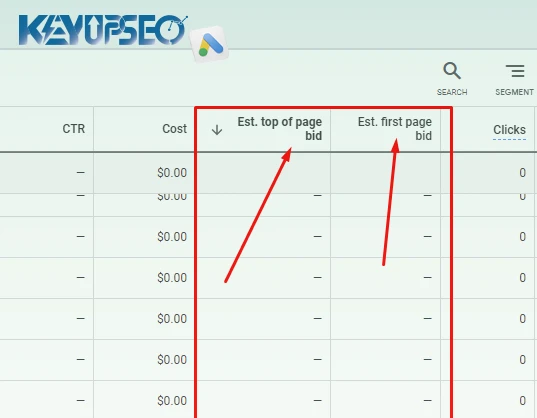
First Page Bid Estimate
This is the minimum amount you need to pay for a keyword to appear anywhere on Google's first search results page.
If you bid lower than this number, Google will not show your ad at all. Your keyword enters what they call "below first page bid" status, meaning it is effectively inactive.
Let me give you an example. You bid 8 cents on "buy bicycle" but the first page bid estimate for that keyword is 23 cents. Your ad will not show until you raise your bid to at least 23 cents.
Here is something important to understand. This number is not fixed. It changes based on your Quality Score and what your competitors are bidding.
If you have a Quality Score of 7 out of 10, your first page bid might be 30 cents. But if you had a score of 10, you might activate that same keyword for only 10 cents. The better your quality, the cheaper your access to page one.
Top of Page Bid Estimate
This is the cost required for your ad to appear above the organic search results, not just anywhere on page one.
Google shows up to 8 ads on the first page. Usually 7. Some go at the top, above the natural listings. Others go at the bottom, below everything organic.
The top of page estimate tells you roughly what you need to spend to join that top group.
But here is the catch. It is only an estimate. Google makes no guarantees. You might bid less than the estimate and still end up at the top. You might bid more and still show up at the bottom.
Like everything else in this system, your Quality Score matters. Higher score means lower cost to reach the top. Lower score means you pay more for the same position.
First Position Bid Estimate
This is the cost required to be literally the first ad. Above everyone else. The very top link on page one.
Same rules apply. It is an estimate, not a guarantee. Your Quality Score and competitor bids determine the number. You might pay less than the estimate and still get first place. You might pay more and end up in second or third.
Now let me be honest with you about something important.
Being in first position feels great. I get it. I have had clients who insisted on being number one no matter what. One client actually told me that Google Ads only means one thing: first link. He was surprised when I explained otherwise.
Here is what years of running campaigns have taught me. First position is rarely the smartest move.
I have seen ads at the bottom of page one outperform first position ads by a wide margin. Lower cost, better return, happier clients. The clients who insisted on being number one often paid three times as much for the same results, sometimes worse results.
The real question you should ask is not "how do I get to first position?" The question is "does being in first position actually make me more money than being in third or fourth?"
For most businesses, the answer is no. For some, yes. But you will never know unless you test both and compare the numbers.
If you want to study how the biggest brands approach this balance between visibility and cost, take a look at our collection of the best advertising campaigns in the world and notice how many of them focus on smart targeting instead of just chasing the top spot.
Before we move on, I should mention that these three estimates are interconnected. Change your bid on one keyword and all three estimates shift. Improve your Quality Score and all three estimates drop. Raise your budget and the estimates might stay exactly the same because they depend on competition, not your daily limit.
We will talk about daily budgets and how they interact with these bid estimates in the next section.
How to Set Your Daily Advertising Budget
In simple terms, your daily budget is the maximum amount you want to spend per day.
Let me walk through an example. You load 100 dollars into your account. When you launch your campaign, Google asks you to set a daily budget. You are essentially telling Google how to spend that 100 dollars over time.
If you set a daily budget of 10 dollars, you are allowing Google to spend up to 10 dollars per day from your 100 dollar balance.
Here is something that surprises most new advertisers. Google can actually spend up to twice your daily budget on a given day. If your budget is 10 dollars, you might see a day where Google spends 20. But do not panic. The next day, they might spend only 5 dollars to balance it out.
Over a full month, Google commits to averaging out to your daily budget. Some days higher, some days lower. The total at the end of the month matches what you would expect from your daily number.
Google also spreads your budget evenly across the day. If you set 24 dollars per day, the system aims to spend about 1 dollar per hour. This is especially helpful if you are running on a tight budget and want predictable spending patterns.
When Your Daily Budget Is Enough
This is the ideal situation.
When your budget is sufficient, your keywords show throughout the day without restriction. Based on search volume, keyword costs, and your bid amounts, Google can fully spend what you have allocated without cutting off your ads early.
You wake up, check your account, and everything runs smoothly. No warnings. No missed opportunities.
When Your Budget Is Limited
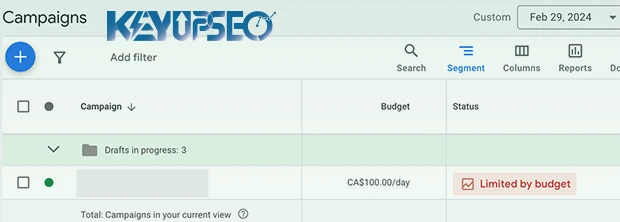
Sometimes your budget is not enough. Google will tell you this directly with a status message that says "limited by budget."
What does this mean in practice?
Google tries to spread your spending evenly across the day. But search volume fluctuates. Holidays happen. Weekends bring different traffic patterns. When demand spikes, your budget might run out before the day ends.
In response, Google reduces how often your ads show. They stretch what remains so you have at least some visibility all day instead of burning everything in the morning and disappearing completely.
To get out of this situation, you have a few options. Reduce the number of active keywords. Lower your bids if possible. Or simply increase your daily budget.
Google will usually suggest specific budget increases. For example, they might tell you that raising from 10 dollars to 14 dollars per day could get you about 120 more clicks per week. The choice is yours.
Understanding how these numbers work together is essential for anyone running their own campaigns. If you want a deeper breakdown with real formulas and examples, check out our guide on how to calculate the cost of Google Ads for a step by step walkthrough of the math behind smart bidding and budget planning.
Dollar, Dirham, Lira... Which Currency Is Better for Google Ads?
People argue about this constantly. Which currency should you use for Google Ads?
Here is the truth. It does not matter which currency you use. Google works with almost any major currency. The system converts and calculates everything behind the scenes.
But there is a catch. Unfortunately, some companies take advantage of clients who do not understand how this works.
I know one agency that charged clients in US dollars but paid Google in Australian dollars. The difference between those two currencies added up fast. The client never knew because they only saw their own invoices. I have also heard stories of agencies using currencies most people have never even heard of.
Let me be clear. I am not accusing every agency of doing this. Most are honest. But you should be aware that these practices exist. Especially in uncertain economic times, you need to pay attention to how your money is being handled.
The goal here is simple. Keep your eyes open. Make sure your costs are managed properly. Later in this guide, I will show you exactly how to find a trustworthy agency for Google Ads.
How Much Should You Fund Your Account at the Start?
Different agencies offer different packages. Some only sell account credit. Others include setup and management services.
If you are new to Google Ads and do not fully understand how the system works, I strongly recommend letting professionals handle the management. Hand over the campaign operations to an experienced agency.
If you already know what you are doing and just need account credit, buy one of the "credit only" packages. Either way, start with a smaller amount. Test the waters before committing serious money.
One Final Thought Before You Go
Running Google Ads successfully is not about picking the right currency or finding the perfect bid on your first try. It is about consistent testing, paying attention to your numbers, and making small adjustments over time.
The advertisers who fail are usually the ones who set up a campaign, forgot about it, and wondered why nothing worked three months later. The ones who succeed check their accounts regularly, test different approaches, and learn from what the data tells them.
If you are serious about growing your website's visibility and revenue, paid ads are only one piece of the puzzle. Organic search is where long term sustainable growth lives. If you are looking to improve your site's position and increase your income over time, I recommend exploring the SEO improvement services at KeyUpSeo to build a foundation that keeps working for you even when your ad budget runs out.
That is the whole guide. Hope it helps you spend smarter and worry less.
Release date : 17 May, 2026